

A note for subscribers—this is a technical post about agentic software development. If it’s not for you, just skip it!
We are in the wild west of agentic coding. It’s a lot of fun! Nobody really knows the right way to program anymore. It’s useful to experiment with different approaches, even if they seem ridiculous. There has never been a better time to be a cowboy coder.

Claude Code got a lot of attention over the holidays. That was a lucky mix of a new model (Opus 4.5) and people having too much time on their hands. It’s true that Opus 4.5 is very good at coding. Good enough that the reality is starting to catch up to the buzz—I really do believe that the vast majority of software development can shift to agentic workflows. Though the Overton window of AI coding hype seems to have adjusted apace, given the extravagant claims on Not Twitter about the emergence of AGI in Opus 4.5.1
If cowboy/vibe coding is lots of fun, it’s not always clear how well it transfers to a professional context where we’re actually held accountable for our software. The online discourse around vibe coding and flashy MVPs is a bit of a distraction for a practicing software engineer. Some of the same practices do copy into our day jobs. But vibes can’t substitute for rigor.2
To that end, here are a few of my practical recommendations for Claude Code development.3 Sorry if they aren’t sexy. You can still vibe code on the weekends, cowboy.
My Boring but Useful Recommendations for Agentic Coding with Claude
Develop in monorepos for portability and consistency
Adopt an agentic workflow, something like Design (Human + AI) → Plan (AI + Human) → Implement (AI) → Review (AI + Human)
Maybe commit any related documents to your repo and call them “thoughts”
Orchestrate your 5 bajillion Claude sessions with tmux or an equivalent tool
Maybe install one of the many tmux wrappers (including the plugin I wrote for this post), or fork your own, I don’t care
Mostly don’t bother with remote sandboxes?
But in a few months maybe you should?
1. Develop in Monorepos
Note: This pattern broke as I was writing this post! Bummer. You can find the bug report on GitHub. I’ve left the recommendation on the assumption it will get fixed.
I run Claude Code within a development monorepo. I am aware that some people hate monorepos (wrongly) and submodules (rightly). But we’re only using the monorepo as a development harness for Claude, so mostly you can shut your eyes and pretend it’s not there. I’ve created an example project on GitHub.
The monorepo solves a few specific problems for me:
How do I share my Claude configurations across machines and with other developers?
How do I support consistent agentic coding workflows?
How do I work across multiple related repositories?
The monorepo enforces a structure of nested context—remember that Claude will apply CLAUDE.md files from all parent directories. The monorepo contains all my repos as submodules. It has context about the interactions between those repos, and it’s configured with the Claude settings I need to develop effectively on those projects. Everything is in version control and most of the relevant context is available on the filesystem. If I run Claude in any of the submodules, it will automatically receive context from the monorepo, including any configured commands and skills (at the time of writing, Claude appears to have a bug with settings4).
Development_Monorepo/              # Monorepo for team/company
├── .claude/                       # Common Claude configurations
│   ├── commands/
│   ├── skills/
│   └── settings.json
├── .thoughts/                     # Saved "thoughts" (see next section)
│   └── TECH-1/
│       ├── PRD.md
│       ├── Plan.md
│       └── Updates.md
├── projects/                      # All your team's projects
│   ├── project_a/
│   │   ├── .thoughts/
│   │   ├── submodule_a1/          # Actual repo!
│   │   │   ├── .claude/           # Repo-specific settings
│   │   │   ├── .thoughts/         # Repo-specific "thoughts"
│   │   │   └── CLAUDE.md          # Fatter CLAUDE.md with repo context
│   │   ├── submodule_a2/          # [submodule]
│   │   └── CLAUDE.md              # Thin Claude.md with project context
│   └── project_b/
│       └── submodule_b1/
├── shared/
├── scripts/
└── CLAUDE.md                      # Thin CLAUDE.md with team context
We add other repos as git submodules under the
projectsdirectory. If needed, we can add subfolders inprojectsto group related repos. Note that we configure submodules withignore = all, since we don’t actually want our monorepo to track the changes in each project.We have a top-level
.claudedirectory with settings, commands and skills common to all projects. We also maintain a.claudein each repo.We have a thin top-level
CLAUDE.mdfile with context required for all projects. We add aCLAUDE.mdfile as needed to projects/repos for project/repo-specific context.We have a top-level
.thoughtsdirectory to store product requirements documents, plans and other material consumed and produced by agents. We add a.thoughtsdirectory as needed to projects/repos for project/repo-specific documents. I’ll talk about this more in the next section!We have a
shareddirectory for code we actually want to stay in our monorepo. You might also want ascriptsdirectory. They’re optional. Add other directories if you’d like, I’m not your dad.
Your repos probably already have a .claude directory for your project-specific configurations. Monorepos help us keep that directory well-scoped to the repository itself. A lot of our Claude commands will be typical development tasks, like /pull_request, which shouldn’t have to be copied across all repositories. We’re also likely to need a minimal amount of corporate/team context in each repository, which is nice to shift out into a better-suited location. In the monorepo, those company/team-level configurations live in the monorepo root’s .claude directory and CLAUDE.md file.
Claude has a few built-in conventions for sharing configurations, including plugins and a managed-settings.json file. Plugins are an attractive alternative to the monorepo, and may have some nice guarantees around access control for an enterprise. They’re also useful to quickly boost Claude’s capabilities. However, it’s harder to hack on plugins, like any software with a distribution step, and they don’t help much with directory layout and context for multi-repo changes.
My example monorepo contains submodules for a website frontend and backend. In this simple example, there’s some marginal benefit in allowing Claude to implement features across both repos (say, user login) but it’s not huge. Once you start expanding to large projects with dozens of interrelated services, the benefits grow. Dependencies between services are often implicit and poorly defined. The monorepo allows us to provide a CLAUDE.md for the relevant project scope that will explain how these repos work together.
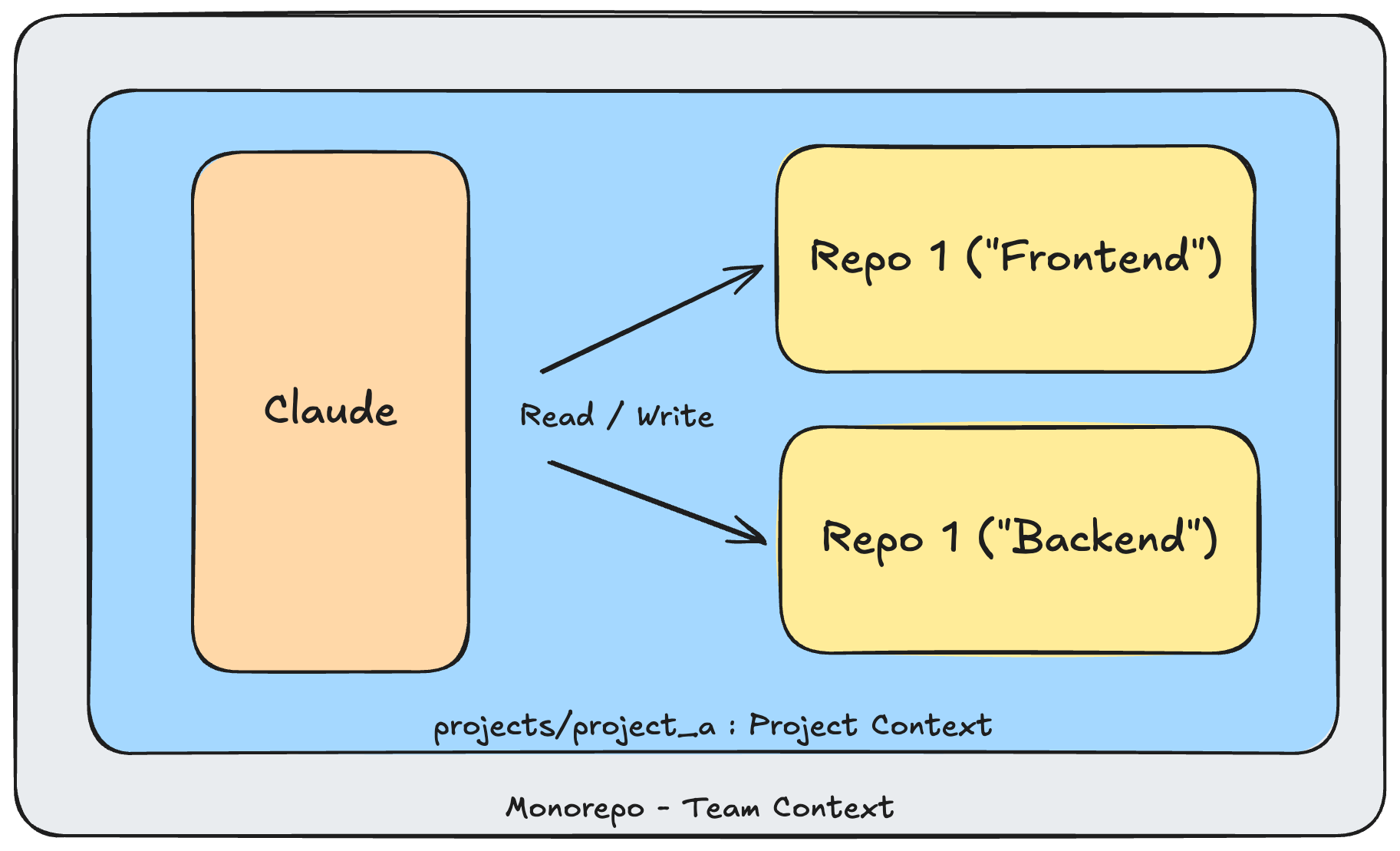
We also avoid weirdness defining MCPs or custom skills to explore related services. There’s a time and place for this, but my experience has been that Claude performs better when it can explore the local filesystem for answers, rather than working across multiple MCPs / remote data sources.
Note that one drawback with running Claude above/outside your target repo is that it will not automatically load the repo context / CLAUDE.md file. If our frontend repo has a special, secret gotcha in the repo’s CLAUDE.md, we won’t know about it by default. We can solve this with good planning workflows (next section) or actual agent orchestration (following).
2. Adopt Agentic Workflows (I Think, Therefore I Plan)
When I say Opus 4.5 supports agentic workflows, I do not mean fully agentic, unsupervised workflows. I appreciate that my LinkedIn feed has filled with corporate influencers advising me to summon an army of AI interns to run Ian Inc. on my behalf. For now, that is more hype than practical advice. If you let Claude make changes without proper supervision, you will end up with compounding errors that render your codebase unusable. What we can do is allow Claude autonomy within defined phases of our development workflow, namely implementation.
Claude’s plan mode is your first line of defense against dumb mistakes. And for plans to be really effective, you need good requirements. Really what you want is a good product document, that outlines the underlying context. Channel the angsty spirit of Marty Cagan. If you’re working on a larger team, you probably already have requirements written as epics or stories in Jira. Lucky you! Write a skill for feeding that information into your plan.5 Otherwise, write a PRD (product requirements document) explaining the context for your feature, alongside your goals and requirements—function and non-functional.
I usually pop my technical specification as bullets under the non-functional requirements. I don’t think it’s worth producing your own technical specification document unless it’s a big/important change. Just review the plan Claude generates and adjust it as needed.
There are lots of possible formats for a PRD. Here’s an example:
# TECH-1 Implement auth

# Background

We forgot to authenticate our website. Oops!

# Goals

- Implement secure authentication for external users visiting our website

# Requirements

## Functional

- Home page and sign-in/sign-up should not require authentication. All other pages must.
- Allow signup with email and password. For now, do not support social login.
- Must adhere to GDPR requirements

## Non-Functional

- Implement with Auth0

# Notes

- Bob says we did this before. See "example_repo" for reference.
- Our senior architect has provided a sample architecture diagram in @ARCHITECTURE.png
- Use sub-agents to do web research on current best practices
I save all my PRDs in a .thoughts directory local to my project, alongside the generated plan and any updates. I first encountered this idea after reading this article from HumanLayer and looking into their CLI tools. It’s a good idea! It is extremely helpful when launching future Claude sessions that ought to reference prior product and engineering decisions. It can also be a critical step in coordinating multiple Claude sessions. If you’re already wed to a ticketing or documentation solution, at least plug a URL into a PRD.md file. My guiding principle it to make as much information as possible available in the filesystem for discovery.
.thoughts/
├── TECH-1/                    # Unique ticket
│   ├── PRD.md                 # My PRD
│   ├── Plan.md                # Claude's plan. Save this!
│   └── Updates.md             # Periodic updates on implementation
Unlike the HumanLayer team, I have not found much value in writing custom commands for the planning process. I tried this for about a week and left with the impression I was always fighting Claude’s built-in instructions. I’m also skeptical that any juice I can squeeze from a specially engineered prompt will represent more than a marginal gain vs advances in the intelligence of the underlying model. So mostly I just stick to simple requests like “Please create an implementation plan for @PRD” or “pwan is weddy, pweeeese help me implement it mistuh cwaude @TECH-1” and that’s enough. I do maintain a skill for working with the .thoughts directory.
Within a Claude session, I then follow a linear workflow built around individual tickets (“thoughts”):
Design (Human + AI)
I write a PRD. I make sure to capture all relevant product requirements. The agent should understand my exact acceptance criteria. I also specify any important technical decisions, and note relevant gotchas.
For large/important features, I solicit critical feedback from an AI before asking Claude to build a plan. It’s useful to ensure all ambiguities are specified.
Plan (AI + Human)
Enter plan mode! Provide Claude with your PRD. Ask it to put together an implementation plan.
Make sure Claude writes the plan down to your Plan.md file, or just copy it yourself from the temporary plan file.
Claude tends to incorporate phases in the implementation plan. Ensure it has the appropriate checkpoints for human or automated review (including tests!)
If the plan phase is long, activate your “birdbrain” and cycle to a parallel Claude session
Implement (AI)
Decide if you should proceed to implementation with the current context window. Anthropic just added a new “Yes, clear context and auto-accept edits” option when approving plans, so you no longer need to worry about unnecessary details from the planning phase polluting your context. Previously, for complex tasks, I would clear the context manually then load the plan from disk. So you should probably select this new option?
Once implementing, let Claude do its thing! Intervene as needed. Activate your birdbrain again, cycle to another Claude session.
Review (Human + AI)
Here, I’m referring to a final local review before you produce a pull request. Make sure things actually work.
Check out this recent blog post on “backpressure.” Ideally a human is not catching obvious mistakes, like failing tests. Experiment with ways to avoid wasted cycles reviewing bugs.
3. Orchestrate with tmux and Pretend You Always Knew About It
We are approximately 2 days away from someone releasing Kubernetes for Claude Code.6 Until then, there’s tmux.
tmux is a “terminal multiplexer” that allows you to split a single terminal into multiple virtual terminals or tmux sessions. tmux sessions are persistent. You can open and close tmux windows without terminating the underlying tmux session. You can also name and list sessions then switch between them. It’s quick to install and easy to use, once you figure out the basic commands (like ctrl+b d to detach from a session).
Is it normal for developers to have a half-dozen Claude sessions running at once? Yes, though with a sharp drop-off in productivity once your brain’s own context window is overwhelmed. Developers increasingly operate in the role of an orchestrator relative to their agents. While Claude spins its wheels on a plan or implementation, developers shift to parallel sessions. Claude’s busy for minutes at a time, which is long enough to interact with other sessions, but not really long enough to do much else productive. By keeping our sessions organized, tmux helps us to avoid a schizophrenic breakdown, as we otherwise juggle a half-dozen ambiguous terminals on a tiny laptop screen, all screaming for permission to force push to main.
As much as I would like to claim to be a prophet of The New Way, I have found many other posts and various GitHub repositories that use tmux to orchestrate Claude Code sessions. Not to mention the strange and experimental alternatives. The open source wrappers I’ve explored do add value over raw tmux sessions. They are also pretty straightforward—you wouldn’t be remiss to fork and/or vibe code your own.

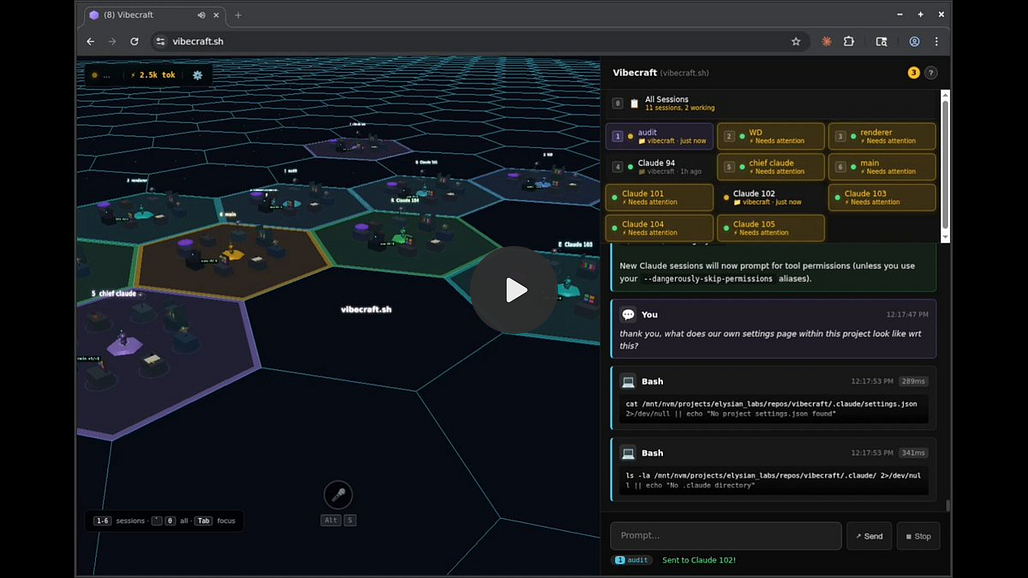
To accompany this post, I spent a couple of days vibe coding7 my own custom Claude Code / tmux session manager. You can find it here: http://github.com/ianwsperber/claude-cowboy.
It has some nice benefits over raw tmux sessions. The repo includes a Claude Code plugin and a separate CLI. The CLI contains several utilities for Claude, such as automatically provisioning clean git worktrees for new Claude sessions (poor man’s sandboxing), and a helpful dashboard written with fzf to review and switch between your various Claude/tmux sessions.
I’ve also experimented with utilities for actual agentic orchestration, i.e. Claude sessions orchestrating other sessions. I am unsure what mental deficiency leads every developer writing an orchestration tool to develop their own pet names for otherwise standard concepts, but I appear to have succumbed to the same psychosis with my Wild West theme. Currently this includes a /posse command to distribute work among multiple agents (the orchestrator is the sheriff and he deputizes other agents) and a /lasso command to issue a one-off request to an independent Claude session.8
Both orchestration commands work… sort of. Claude today does not have any primitives for agent orchestration beyond its own sub-agents, which are helpful but are not interactive and still populate the parent context with their results. Writing orchestration utilities requires some workarounds for passing messages and waiting on responses, none of which feel very robust, and I’m afraid might chew through a lot of unnecessary tokens. So for now it’s a proof of concept more than a full feature set. I decided I needed a mental health break from hyper-optimizing my Claude setup.

I am confident that Anthropic will add native orchestration capabilities to Claude Code in 2026. The advances of Opus 4.5 have moved too much of the development community in this direction. There are clear opportunities to improve remote sessions and agent-to-agent communication beyond what I could implement in a simple side project. I don’t see any technical reason why a mature orchestration feature set could not be added today. It shouldn’t require any further advances in SOTA model intelligence.
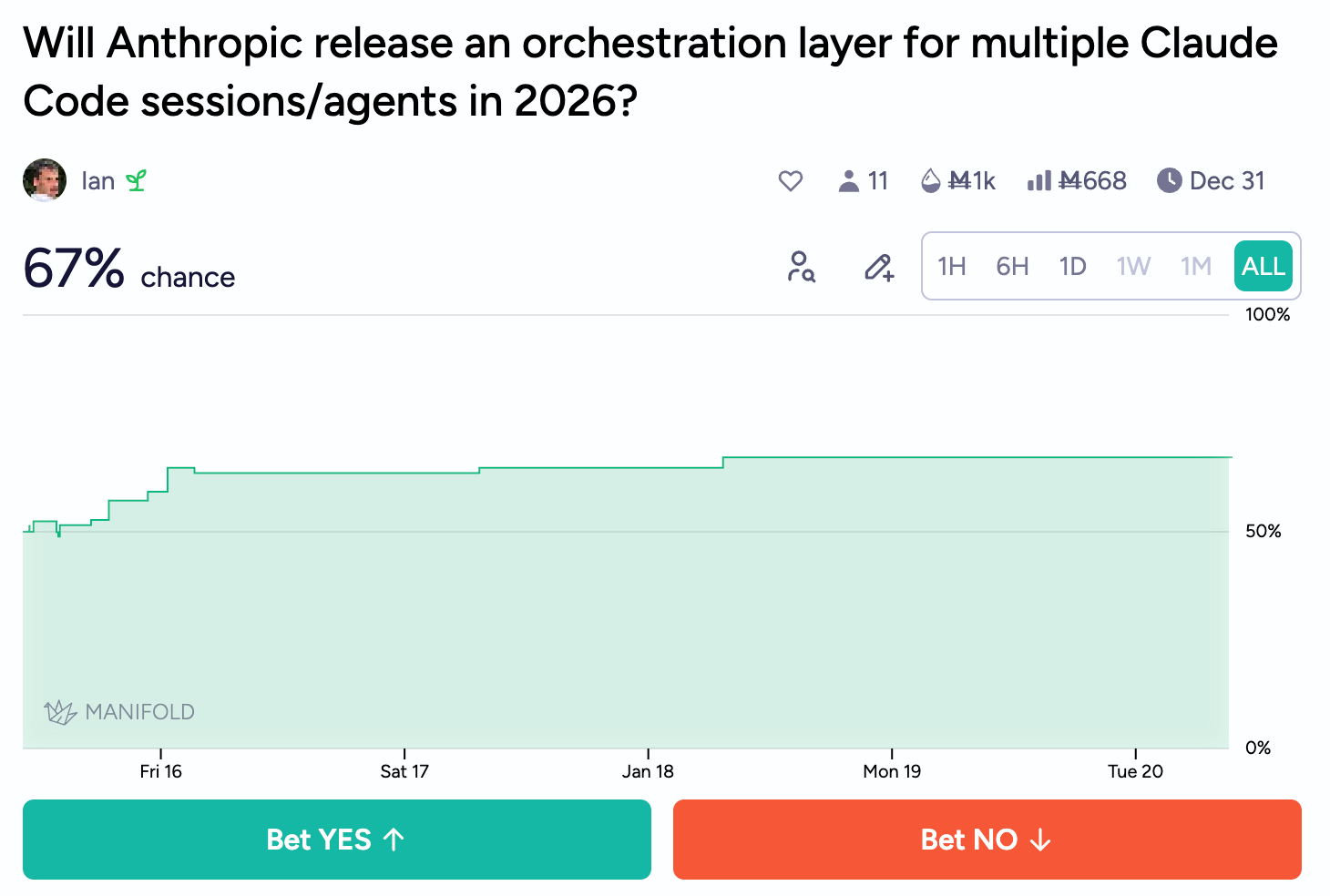
While there is a role for developers to act as agentic operators today, I am skeptical this will last. The current confluence of model intelligence, speed and cost allows us to add value through orchestration. An agent can be pretty independent planning and implementing a feature, but it’s not super fast. Orchestration leverages that downtime. However, assuming SOTA models do continue to advance over the next year, I would wager that we will move quickly toward orchestration agents that run and review multiple sessions on our behalf. Today’s toy orchestration architectures might find production applications quicker than we realize. For this to happen, we may actually need a “Kubernetes for Claude Code”—i.e., a way to quickly invoke isolated sandboxes.
4. Probably Don’t Bother with a Sandbox? (Yet)
The general consensus in the development community is that security is boring and we would all be a lot more productive if we didn’t have to worry about it. But we are also very worried that if we keep selecting “yes” whenever Claude asks for bash permissions, then we will eventually delete all our family photos and compromise our bank account. The solution, for those of us with moral character, seems to be developer sandboxes.
In practice this is quite hard to get right. There are a number of existing solutions for managing remote development environments (like GitHub Codespaces) and there are a number of existing solutions for managing lightweight containers (think Docker and Kubernetes). But Claude Code requires both the flexibility of a full development environment and the safety guarantees of containers. I haven’t found a good solution for both. I guess you could literally stand up an EKS cluster to act as your personal Claude Code session swarm, but this seems dubious to me from a cost-benefit standpoint (maybe it would make sense for a large company?).
Fly.io is trying to solve this exact problem with sprites. Unfortunately the product is not ready for prime time usage. The documentation is nearly nonexistent, the CLI is unintuitive, there were launch bugs with sprites not shutting down and there is currently no way to launch sprites from an image (which seems like a non-starter if your local environment requires any lengthy setup steps). Still, they are moving in the right direction!9
I am curious what Anthropic themselves might try to build for better sandboxes. Claude Code Web reads to me like a tentative step in this direction, but the web preview has limited utility for proper development. I would expect a lot of fixed costs for a company to offer a secure fleet of containers for ad-hoc sandboxes, and I’m not sure how well that fits within Anthropic’s current vision and org. I’d also guess that many users want the flexibility to change model providers, which may make them reticent to buy into the Anthropic ecosystem. However, if there is a future in which agents orchestrate development across dozens or hundreds or independent sessions, then I suspect you want to own those capabilities. Especially for a company that has maintained an image as the programmer’s model of choice.
So until there is a good, accessible solution for developer sandboxes, I would continue working on your local machine for Claude Code development. I do want to try setting up a claude user on my machine, which should provide some better security guarantees than my personal user. I’ve also thought about buying a Mac mini to work as a dedicated, local Claude box. Or I might just wait until Fly.io or another company releases a better solution for sandboxes. I anticipate that will happen very soon.
I guess this is what happens when LinkedIn influencers are forced to take a vacation?
I suppose there are contexts in which this is not true, like playing in a funk band
I’m not going to cover the truly standard best practices for Claude Code. But you can check out https://www.anthropic.com/engineering/claude-code-best-practices
In my example repo, I manage this with a script to configure settings in all submodules. It’s an imperfect solution. Hopefully the Claude behavior is fixed soon.
If you have any other product documents, such as outputs from a design sprint or formal discovery process, include that as well. They provide underlying business context and user needs that will help Claude understand implicit expectations not listed as a requirement
If AI is going to replace most jobs this could be seen as a public works initiative to keep DevOps engineers employed for another decade
I mostly did not follow my own advice and vibe coded many changes without proper PRDs. The results show! The codebase is bloated and prone to regressions. Errors compound quickly if you do not adhere to a robust workflow for agentic development. I am but a simple cowboy attempting to write a blog post in his free time.
I’d also like to add a /barkeep command to set Claude on a loop, offering drunken advice on which sessions need your attention. I will accept any pull requests.
Though I am skeptical that long-lived sandboxes are better than ephemeral sandboxes? If we actually run Claude with expansive permissions, including web search, I worry your sandbox could get compromised via prompt injection or a similar attack vector. In theory once compromised you would have to assume all data in the sandbox is exposed, but in practice an ephemeral sandbox might reduce the risk of exploitation?
Excellent work breaking down the future of agentic development. Your recommendations particularly around the strategic use of monorepos were incredible. it is always a pleasure to read your thoughts, whether on this subject or others.
> I am unsure what mental deficiency leads every developer writing an orchestration tool to develop their own pet names for otherwise standard concepts, but I appear to have succumbed to the same psychosis with my Wild West theme.
Here for it. I think the process of writing systems that direct AI agents to collaborate is encouraging devs to adopt a more explicit world-making mindset relative to the usual challenges of variable/class naming. Giddy-up.